



Facebook review
 Analysis by GetAllApps
I use Facebook most when I want to keep up with people and groups that don’t all gather in one place. It can feel quick and convenient when I open it with a clear purpose, but it is also easy to lose time moving between posts, conversations, and videos. My overall impression is of a broad social app whose speed depends as much on what I’m trying to do and the connection available as on the app itself.
How quickly it gets me where I want to go
Facebook is a free social app from Meta Platforms, Inc., built around a mix of personal connections, group activity, and shared media. In straightforward moments—checking a notification or looking for a recent conversation—I find the experience direct enough. The larger challenge is not always opening the app; it is deciding what to do once the feed begins presenting more things to look at.
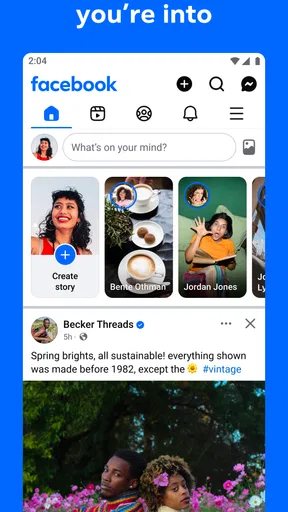
The app’s scale is part of its appeal, but it also means the experience is not a single, tidy task. A quick visit can turn into switching between a friend’s update, a group discussion, and a video. That variety makes Facebook useful as a central place to check in, yet it can make the interface feel busy compared with a messaging app designed around one conversation at a time.
I would not judge its speed by how quickly the first screen appears alone. A more useful test is whether I can find the person, group, or discussion I came for without getting sidetracked. When I already know where I’m headed, the app feels more manageable. When I open it with no particular goal, browsing can feel less efficient—even if the controls respond promptly.
When a light check-in becomes a heavier session
Facebook’s workload can change considerably during a single visit. Reading a short text update is a lighter task than moving through a feed filled with images and video, and a session that involves several groups and conversations asks more of both the app and the person using it. I treat that variation as a practical reason to keep visits purposeful, especially when I’m using a device that already feels slow.
A useful habit is to decide what I need before opening the feed: reply to a message, check a particular group, or look for an update from someone I know. That gives the visit a natural stopping point. It also reduces the chance that a quick check turns into a long scroll through content that was not the reason I picked up my phone.
For example, if a family member mentions a change of plan, I can check the relevant conversation and then leave rather than trying to follow every new post. If I’m looking for a local group discussion, I can focus on that group instead of treating the general feed as a search tool. This is one of Facebook’s useful trade-offs: it puts many kinds of social activity together, but the user has to provide some of the structure.
Reliability and the value of a clear route
Facebook has a 4.6 average from around 187 million ratings, and it has been installed over 10 billion times. Those figures speak to its reach, but they don’t guarantee that every visit will feel smooth on every device or network. In practical use, I think of reliability as being able to return to the social spaces I care about and continue a conversation, rather than expecting the app to feel identical in every situation.
When something seems slow, I first separate the app from the task. Is the connection struggling with media? Am I switching rapidly between several parts of the app? Is the phone already under pressure from other activity? That quick check helps avoid blaming Facebook for a delay that may come from the broader situation. If a screen does not appear as expected, I give it a moment and retry the specific action before restarting the whole session.
For regular use, I find it helpful to keep the purpose narrow. If I am checking a group, I stay with that conversation; if I am responding to someone, I finish the reply before returning to the feed. This is not a technical fix, but it reduces unnecessary back-and-forth and makes it easier to notice whether a genuine delay is repeating or was simply a temporary hiccup.
Device limits and everyday trade-offs
Because Facebook brings multiple forms of social content into one app, it may not be the best fit for someone trying to conserve attention, storage, or device resources. I avoid making assumptions about how it behaves on a particular phone: performance can depend on the device, connection, and what is being viewed. The sensible approach is to try the app on your own phone and pay attention to how it feels during the activities you actually plan to use.
If a phone is older or already feels crowded with apps, I would be especially selective about long sessions involving media. A focused check of messages or a specific group is a better test than opening the feed and letting it run in the background of an hour-long browsing session. If the app feels sluggish, closing other demanding activity and trying again can help clarify whether the problem is Facebook or the phone’s overall workload.
There is also an attention cost that matters more than raw device performance for many people. Facebook’s mix of updates and discussions can make it harder to stop at the moment you intended. I recommend using it with a definite task when time is limited, and choosing a narrower alternative when all you want is direct conversation. A dedicated messaging app is often better for a quick exchange; Facebook makes more sense when the group or social context is the point.
Where Facebook fits among social alternatives
Compared with a simple chat app, Facebook is broader and less focused. That breadth is helpful when friends, relatives, and interest groups all use the same place, because I can check different kinds of activity without moving between several services. The downside is that a message can sit beside a stream of unrelated material, which may be distracting if I only wanted to contact one person.
Compared with image-first or short-video social apps, Facebook feels more mixed in purpose. Its strength is not that every part of the experience serves the same kind of browsing; it is that different social circles can maintain their own conversations and updates in one familiar environment. For someone whose community already uses Facebook groups, that can be more valuable than a sleeker app that their friends rarely open.
That comparison also points to who should skip it. If you want a quiet, tightly controlled space with only direct messages, or you dislike feeds that invite extended browsing, Facebook may not be the right choice. If your main need is following a small number of creators or sharing visual work, a platform built specifically around that activity may feel more focused. I would choose Facebook for the people and groups I need to reach, not simply because it can do many things.
Small habits that make the app easier to use
My most useful tip is to treat the feed as a destination, not a starting point for every task. When I already know the group or person I need, going straight to that social space keeps the visit more purposeful. It also makes Facebook feel less overwhelming, because I am not asking one long stream to function as my entire navigation system.
I also try to separate checking from catching up. A quick visit to see whether someone has replied is different from a deliberate browsing session. Naming that difference before I open the app helps me decide whether I have time for the feed or should handle just the immediate task. This is particularly useful when I’m checking Facebook between errands or while waiting for something: a specific goal is easier to finish than an undefined scroll.
For group activity, I look for the context of the discussion before responding. A post can draw replies from people with different assumptions, so reading the surrounding conversation helps me avoid adding a comment that misses the point. This is a social rather than technical detail, but it improves the quality of the experience and saves time spent correcting misunderstandings.
Who will get the most from it
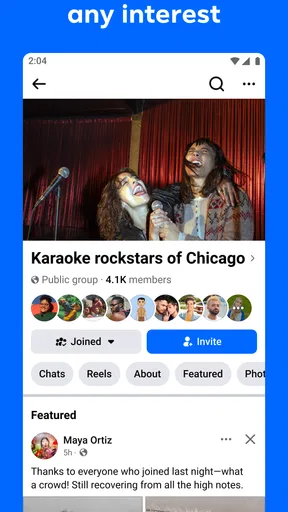
Facebook is a good fit for people whose social lives already include active groups, family updates, and conversations there. It can be especially handy when a group is the main reason to install it: rather than chasing updates across separate channels, I can check the shared space where members are already talking. Its social category is broad in practice, covering both personal connections and community activity.
The app is marked for teens, so younger users and families should consider that audience label when deciding whether it is appropriate. It is free to download, with in-app purchases listed from five cents to ten thousand dollars per item. I would still review purchase prompts carefully and make sure any spending decisions are intentional, rather than tapping through an unfamiliar screen in a hurry.
For someone who mainly wants a calm utility that opens, completes one job, and closes, Facebook’s breadth may feel like unnecessary weight. For someone who wants a shared meeting point for a varied social circle, that breadth is precisely the reason to use it. The important question is not whether it contains many kinds of activity, but whether the people and groups that matter to you are there.
My performance verdict
After weighing the fast, focused tasks against longer and more demanding browsing, I see Facebook as a capable social hub rather than a consistently lightweight app. It can feel convenient when I know what I want to check, while extended feed sessions are more likely to feel busy and harder to control. I would not promise a particular speed or smoothness on every phone; I would judge it by how well it handles your usual conversations and groups on your own device.
My recommendation is to use Facebook when its network of people and groups solves a real need, and to keep a narrower app for moments when you only want a direct message. That gives you the advantage of its broad social reach without expecting it to be the best tool for every kind of interaction. If you value that shared space and can manage the distractions, it remains a practical choice; if focus and simplicity matter more, a more specialized alternative will likely suit you better.
Pros and cons
Pros
- Groups make it easy to connect with people who share your interests.
- Events help you discover local activities and keep track of plans.
- Marketplace lets you browse nearby listings and sell items.
- Pages offer updates from businesses and public figures in one place.
- Custom privacy controls let you manage who sees your posts.
Cons
- The feed can feel cluttered with suggested posts and promotions.
- Frequent notifications may become distracting.
- Marketplace listings can include scams or misleading offers.
- Privacy settings can be difficult to navigate.
- The app may use substantial battery and mobile data.


